A Simple Guide to Creating a Wikipedia Page for a Person
To create a Wikipedia page, start by checking if your subject meets notability standards and has independent sources. Then, write the information following Wikipedia’s format, add proper references, submit it for approval, and handle feedback professionally.
In this blog, we will shed light on Wikipedia’s eligibility criteria and simple steps to write a wiki article. Thus, keep reading to know more.
The Eligibility Criteria for a Wikipedia Page
Whether you work for a Wikipedia page creation agency in USA or are an independent writer, these are some non-negotiable guidelines of the online encyclopedia that you should keep in mind:
- Neutral Point of View: It is one of the three content policies of Wikipedia, apart from Verifiability and No Original Research. It simply means that all content on Wikipedia pages must be written in a neutral tone and be free of bias.
- Independent Resources Only: It refers to using independent content about the subject you are writing a wiki page for. They can include research articles, newspapers, magazines, and other non-promotional content.
- No Original Research: It refers to material such as facts, allegations, or ideas that are not supported by reliable and published sources. Wikipedia strictly prohibits the use of such content when creating a page for the platform.
- Conflict of Interest: A situation where a person may be writing about themselves, someone they know, or the organization they work for. Wikipedia does not allow people to write about themselves, as staying unbiased in such situations can be difficult.
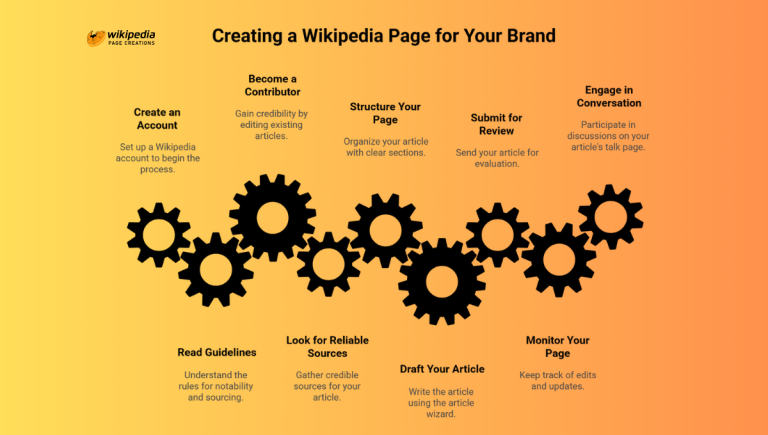
Step-by-Step Guide: How to Create a Wikipedia Page?
If you are providing a professional Wikipedia page article writing service for a subject, then you should follow the steps below to create a page that adheres to the platform’s guidelines and is easily approved:
Step 1: Check if the Person Meets Wikipedia’s Notability Criteria
First, check if the person you are writing about fits into Wikipedia’s criteria. That means they should have third-party sources about them, and you should have no personal connection with them to write factual information for their page.
Further, search if there is an existing page about them. If a page exists with all the relevant information and you only need to add a few lines to it, then edit the existing page. However, if no page exists about them, then you can write from scratch.
Step 2: Collect Reliable and Independent Sources
Collect every relevant piece of information about the person you are writing about and choose non-promotional content. Below, we have listed both eligible and unacceptable sources:
Acceptable Sources:
- Academic Publications
- Books Published by Recognized Publishing Houses
- Magazines
- Journals
- Encyclopedias Other Than Wikipedia
Non-Acceptable Sources:
- Press Releases
- Websites
- Promotional Blogs
- Social Media
Step 3: Create a Wikipedia Account
Before you create a Wikipedia page, you should have an account on the platform. When you write without one, your IP address and username will be visible. However, if you make an account, then only your username will show, and your IP address will be hidden.
So, to maintain privacy and security, here are a few simple steps to creating a Wikipedia account:
- Go to Wikipedia.org
- Select your language
- Select create account
Step 4: Write the Page in Wikipedia’s Format
Wikipedia has a specific structure that every page creator must follow to get their article published on the platform. Below is the format so that you can write accordingly:
- Introduction: In this section, you will give an overview of the person you are writing about. It includes their name, birthday, birthplace, nationality, and occupation. It also briefly explains what the person is known for and their contributions.
- Early Life and Education: Here, you will go into detail about where the person was born, their family background, religion, education, and how their early life went before they gained recognition.
- Career and Achievements: This is the main section of your Wiki page and will showcase in detail the breakthrough points of the person’s career, how they achieved success, and what their contributions were to the industry they worked for.
- Awards and Recognition: You will cover every award, nomination, certificate, or other form of recognition the person received for their work. For instance, if you are covering an actress, then mention the awards she was nominated for and the ones she won.
- External Links: This is the final section of your Wikipedia article and includes the links to every reference you used in your page.
Step 5: Add Proper Citations and References
When you finish writing your first draft, review it properly. Check to see any spelling or grammar mistakes and correct them. Ensure that your content includes verified information and that you have added references where required.
Moreover, be smart with citations. Do not use irrelevant links that only mention your subject briefly. Instead, choose at least 3-5 sources that cover the person in detail and use them wisely throughout your content.
Step 6: Submit the Page Through Articles for Creation
Articles for Creation is Wikipedia’s review system, where articles are reviewed and checked thoroughly before they are approved and published on the platform.
Further, it also protects your article from immediate deletion, as the reviewer will first read and check your content and highlight areas for improvement. While you can publish directly, if your article has any loopholes, it will be deleted right away.
Step 7: Respond to Reviewer Feedback
When you get the feedback from the reviewer, carefully analyze it and prepare to make changes to your article. Remember, their feedback is for your own good, so use it refine your article, not to take it to your heart.
Hence, replace promotional phrases with factual sentences and remove unnecessary details. Also, add independent resources in sections where you lacked before.
Frequently Asked Questions
How long does it take for a Wikipedia page to get approved?
Getting your Wikipedia page approved can take you anywhere from a few days to several weeks, depending on your article’s quality, length, and the number of revisions.
Are Wikipedia pages permanent once approved?
No, Wikipedia pages can be edited whenever a writer wishes and can also be deleted if they violate any of the platform’s guidelines.
What happens if my Wikipedia page is rejected?
If your Wiki page gets rejected, then make the improvements and changes mentioned by the reviewer and resubmit it.
Do It Right or Do Not Do It at All
When you create a Wikipedia page about a person, you not only build your credibility as a writer but also present your subject as a reliable and authoritative individual.
Whether you are covering a celebrity, a sportsperson, or a business entity, if you write your page in accordance with the platform’s criteria and format by following the steps in this guide, you will increase your chances of publishing your first Wikipedia article successfully.

I am a digital reputation specialist and expert in encyclopedic content standards. With my blogs I try to bridge the gap between brand storytelling and Wikipedia’s rigorous notability requirements. By focusing on verifiable sourcing and neutral point-of-view writing, I help high-profile individuals and global organizations establish a credible, permanent digital footprint that stands the test of scrutiny.”